Showing posts with label photoshop. Show all posts

Tuesday, September 29, 2009

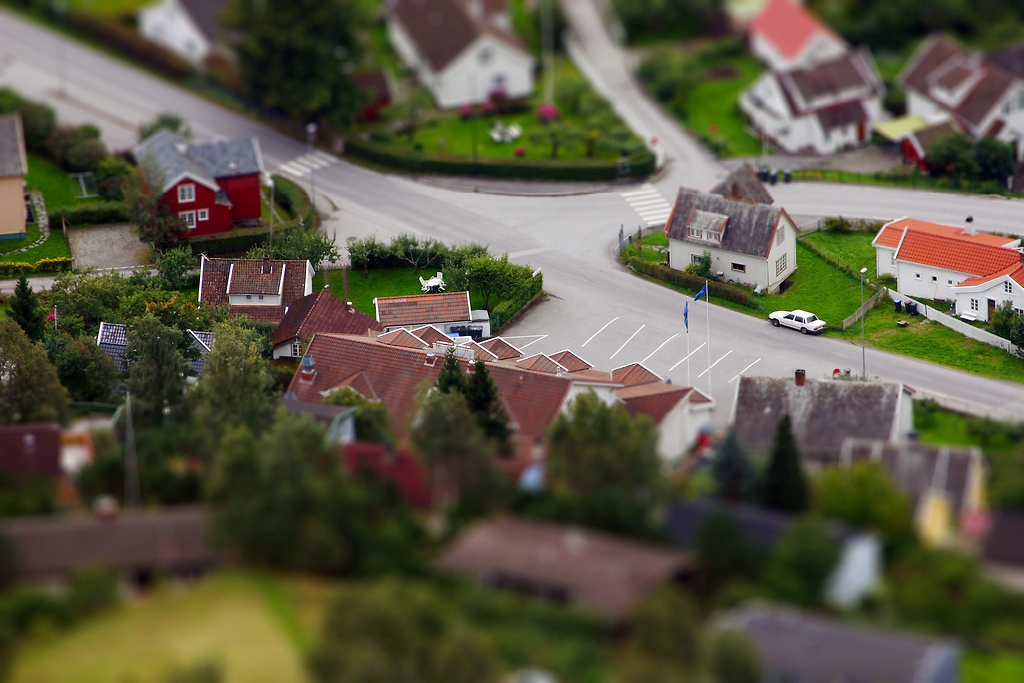
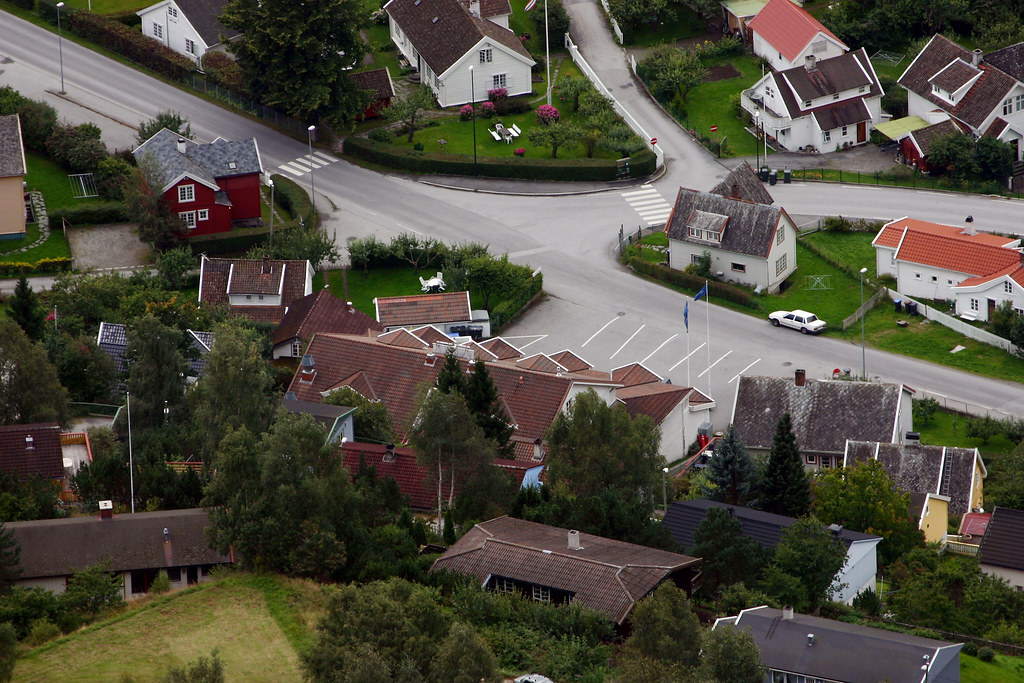
Norwegian Village in Faux Tilt Shift

Donald converted this photo from the overlook in Aurland, Norway. . .

Aurland Fjordhotell

. . . to a faux tilt shift image:

Faux Tilt Shift

Such a fun effect!

Friday, February 27, 2009

CD Cover Meme

My parents sent us an e-mail, yesterday, with a fun meme for designing your imaginary band's first CD cover.

Here are the instructions (with our CD covers below):

1 - Go to Wikipedia. Hit “random”
or click http://en.wikipedia.org/wiki/Special:Random.
The first random Wikipedia article you get is the name of your band.

2 - Go to "random quotations"
or click http://www.quotationspage.com/random.php3.
The last four or five words of the very last quote of the page is the title of your first album.

3 - Go to Flickr and click on “explore the last seven days”
or click http://www.flickr.com/explore/interesting/7days.
Third picture, no matter what it is, will be your album cover.

4 - Use Photoshop, Powerpoint or similar to put it all together.

My band's CD cover:


Donald's band's CD cover:


And then I made one for the dogs. (g)
This is their band's CD cover:


It's kind of addictive! So, what does your band's CD cover look like? ;o)

Monday, December 1, 2008

Stuff Done

Done today:
  • Laundry-- sorted, washed, dried, folded and put away: clothes, towels, and two small rugs
  • Unloaded/reloaded dishwasher
  • Cleaned out/reorganized two messy kitchen cabinets
  • Put contact paper in those same two cabinets
  • (Helped Donald) put nicer frosted glass shades from our old bedroom ceiling fan on the living room fan
  • Added to "give away or donate" pile
  • Did a little touch-up painting on furniture
  • A little vacuuming
  • General cleaning/decluttering (though you wouldn't know it to look at the place-- much more to go)
Also, played with Photoshop a little. (Hey, a girl's gotta sit down sometimes!) I spotted a couple of nice photos in the "Commons" section of Flickr and thought it'd be fun to layer some of my own photos over them. (You'll find links to the original photos in the captions in my Flickr photostream, if you're curious. And as always, you can click images here in this blog to see them larger.)


I doubt their times were really any simpler than ours, but I do envy them just a little. . . even if they didn't have Photoshop or the Internet for entertainment. ;o) I like imaging their reactions if I could go back and tell them, "One day, years and years into the future, almost anyone living in a modernized country will be able to hit a few buttons and look at this photo of you!" Would they believe me? Would they care? (g) I wonder what they'll be doing with our photos, hundreds of years from now. . .

Sunday, November 30, 2008

Something Different

Anything different. . .

(Click to see bigger.)

Friday, November 28, 2008

Wasting Time w/ Photoshop

I'm an expert. Not at Photoshop, but at wasting time with it.

If I were an expert at Photoshop, I'd have made the edges look curled, torn, and/or burned like an old piece of paper, but oh well. The program was in a really bad mood toward the end of this session, so I decided this was good enough.


(Click to see it larger.)

I was having lots of fun and contemplating making "WANTED" posters for everyone I've ever known, until Photoshop started misbehaving. Maybe some other time.

Meanwhile, no, our Christmas tree isn't up yet, and it probably won't be going up today. To tell the truth, I just don't feel in the mood for Christmas, yet. Sometimes it feels like a waste to put so much effort into something that no-one will even see (apart from the two of us). I'm sure I'll end up putting it up sooner or later, but at the moment it just seems like a lot of work for nothing. . . (Yes, obviously the Christmas spirit isn't in me today.)

Wednesday, September 17, 2008

More "Doings"

More things I've been doing (again, apart from "the usual"):
  • Enjoying the wind again, last week (even if it was an Ike by-product). Wind is something of a rarity in our summers, except for right before thunderstorms. It's so much more pleasant to breathe when there's a little circulation going! ;o) (Incidentally, our area also had some mild coastal flooding due to Ike. Poor Donald's drives across the Bay were worse for a couple of days because the Causeway was closed.)
  • Looking at Trixie. She definitely has biscuit cream markings on her face and ears, and behind one ear in particular. I'm not sure if they've "settled", yet. I've tried to photograph them, but so far haven't had much success. (They're just not that distinct from the white fur.) Last week, her left ear was up, while the right continued to flop. It would've been adorable if they were to stay that way, but I think they're both more or less standing up, now. And she's still pretty cute, in my biased opinion. ;o)
  • Finding out what kind of a nerd I am. ;o) Turns out I'm an Uber Cool Nerd. Don't believe me? I was a bit skeptical, myself. Even I don't honestly think I'm "uber cool", but NerdTests.com does! See?

    NerdTests.com says I'm an Uber Cool Nerd.  What are you?  Click here!

    A different quiz on the same website ranks me as "Lightly Nerdy". I'm satisfied to leave the "Heavily Nerdy" ranking for those nerdier than I. ;o)

    I am nerdier than 51% of all people. Are you a nerd? Click here to find out!

  • Playing around with a new Photoshop technique. I'm still a beginner at layering textures and patterns over photos, but so far I'm having fun with it. (I see a texture photo expedition in my near future. It's too much trouble, having to credit sources. And besides, it'd be fun to know that everything in the finished product was originally captured by little ol' me. Yeah, I never was much for team sports, either. . .) I get the feeling that this is another of those things that other people will shrug about (g), but if you're interested, here's a link to my set of textured photos.
  • Going on a disc golf outing, last Saturday. One of Donald's coworkers arranged it, and we decided to bring Trixie along so she could meet a few more new people. She's definitely at the "I know no strangers" stage of life! Anyone who showed an ounce of interest in her was an instant best friend. She really wanted to run off and meet the dogs and people who weren't part of our group, too. (g) As for the actual disc golf, Donald participated in the game while I wandered around with Trixie, listening to music and taking some photos. That was our first time in Chickasabogue Park. Interesting spot, but probably a little too far of a drive for us to go very often.
  • Counting down the days of Donald's last week at his old job. Only Thursday and Friday are left! I wonder what next week will be like, as we begin adjusting to a totally new set of circumstances. . . Definitely something different!
  • Getting Donald a new office chair, as I think I mentioned before. It's here now, and we'll/he'll probably assemble it tonight. Though I could probably figure it out on my own, I'm going to wait and let him be the head of that project, seeing as it's going to be his chair and all. . . ;o) Here's what it's supposed to look like when it's all put together:(adopting a fake foreign accent) Ees beautivul, no? ;o)
  • Finishing Anne of Windy Poplars. The end had more of a bittersweetness than I'd remembered. It's kind of sad that there could be no references to all those characters in most of her other Anne books, since all but Anne of Ingleside were written prior to AoWP. One of the problems with writing a series "out of order", I guess. (g) As for any references to Katherine Brooke, Rebecca Dew, et al. in AoI. . . There may be some, but I don't remember them. It's been a long time since I read AoI, which isn't one of my favorites and hardly even counts as an Anne book, as far as I'm concerned.
  • Waiting to see where our (most likely to be) new neighbors will choose to build. Again, as far as I know, the proverbial stone hasn't yet been graven, but it's looking more and more like a certainty!
  • Hoping not to pick up any ticks. Twice now Mom and Dad have found multiple ticks on themselves after walking over the newly-cleared land (where they may be building). The "newly-cleared" part is what worries me most. You expect that you might find a tick on yourself after you go walking through tall grass or shrubby wilderness-- but to get them just from walking over open land? Gives me the heebie-jeebies! What's particularly annoying is that it's nearly the time of year I most want to go "wandering". I wonder if spraying our shoes and legs with Deep Woods OFF would keep them away? I don't really love bathing myself in large dosages of DEET, but I'll do almost anything to keep mosquitoes and (shudder) ticks at bay. . .
  • Throwing-- and rolling"-- the frisbee for Trixie. She enjoys chasing it and (sometimes) barking at it before picking it up and (again, sometimes) bringing it back to us. If only we were all so easily amused.
  • Writing this entry in dribs and drabs over the course of days. And now I think I've finally collected enough "dribs"-- and maybe even one or two "drabs"-- to post it on my blog.

Monday, July 14, 2008

You can't trust the Internet, etc.

Or at least, you can't trust everything you read on it.
But you already knew that, didn't you? ;o)

Some of you also know that when someone sends you a photograph of themselves standing on a gigantic ant bed, it might be a joke photo that they made with Photoshop. . . (g)

. . .On the subject of Photoshopped pictures, here's a little quiz that tests your ability to tell whether or not a photo has been manipulated. (I think it's a little hard to tell, sometimes, with such small photos, but it's still interesting. If you want to give yourself a little better chance on the quiz, you might want to watch the segment of NOVA that deals with this subject.)

Anyway, where was I?

Oh, yeah. I was making the brilliant observation that many times you can't trust what you read online, because anyone (myself included (g)) can get on here and write just about anything. Sometimes we know what we're talking about, but sometimes we don't.

For instance, I was wondering why some yarn is called "ombre" and some is called "variegated". I figured there must be a difference-- but what? I (of course) looked to the Internet for an answer. Multiple sources indicate that "ombre" yarn is dyed various tints and shades of a single color/hue (dark blue, medium blue, and pale blue, for example), while "variegated" yarn is dyed a number of completely different colors (yellow, blue, and green). This holds true for some of the yarns I've seen, but there are also plenty of "ombres" that don't fit that definition.

So which is correct? The supposed definitions of ombre and variegated yarns, or the manufacturers and namers of yarns? Even the Internet can't tell me-- and it's so vital that I know, too! ;o)

_ _ _ _ _ _ _

Dog-lovers: There are some new photos of Soffi (Donald's parents' new puppy) here. There's also a video of Soffi and Lukas playing together. (Just be aware that the video may take a while to load.)
_ _ _ _ _ _ _

After taking a little break from crochet, I finally tried my hand at making something other than a granny square. Nothing fancy-- just a simple flower shape from some scrap yarn. I imagine I made some mistakes along the way (partly because there are still a couple of things I'm not 100% sure how to do), but at least you can make out that it's a flower.

You know what this means? I may be able to follow patterns, provided that they're very basic. Amazing. ;o)

It may not sound like much, but I'm not much for following patterns. I was more of a "play it by ear/heart" musician in Band-- which meant I never applied myself much to learning to read sheet music well-- which meant my sight-reading skills were very poor, later on. I'm pretty much a "play it by ear" sort of person in most of my hobbies. . . I think I prefer some things that way, but for crochet, it's probably a good idea to learn to follow patterns.

_ _ _ _ _ _ _

Donald and I went out for lunch and a movie, today. We saw WALL-E. I'm not sure what I expected, but whatever my expectations were, I think they were surpassed. (g) It was a really sweet and amusing movie-- especially considering that the main character is a robot.

I don't want to give away too much, so just to be sure that I don't spoil it, I'm posting a SPOILER WARNING now. Don't read the rest of this post if you don't want the film potentially spoiled for you.

WARNING!!!!

S
P
O
I
L
E
R
S

(for WALL-E)

.
.
.

I was already in a somewhat more emotional mood than usual, today. (I woke this morning from a sad dream involving Daisy, and some of those feelings were still hanging around, I guess.) So I'm not sure how much of my emotional response to this movie was from something other than the movie itself. . . Maybe it was the lack of dialog in the first part of the film. Maybe WALL-E reminded me of E.T. Who knows! (g) Whatever it was, I found myself repeatedly getting teary while watching this movie.

As I wrote before, over all, I enjoyed the film. It was sweet in spots, funny in others, and generally entertaining. Even if you aren't a "robot person" (and I'm not), most people will enjoy this movie.

However, there are definitely some not-so-hidden messages. For instance:
  • People are growing increasingly fat and lazy.
  • People are so constantly connected to their gadgets that they're becoming distanced from one another and disconnected from the world around them.
  • The world is becoming too "consumerist"/consumption-driven.
  • We're killing the planet, and soon the only way it will be able to "heal" itself is for us to leave for a long, long time.
I think there's truth in some (not all) of the messages. (Well, obviously. All we have to do is look around us-- or even in the mirror :o(-- to see the first one.) However, I can't really envision a future where there'll be so much garbage that there's nowhere else to put it but to pile it higher than sky-scrapers. (g) And honestly, I guess what it boils down to is that I feel that it should be my decision how much I want to "consume". Also, I'm a bit put off by the trendiness (some would say "timeliness", but no, I mean "trendiness") of the environmental angle.

Anyway, even though there were "messages", they certainly didn't ruin the film for me (and I think Donald found them less obvious that I did. . . or at least not really "political" in nature). If you want to see a really weird movie full of propaganda, rent Happy Feet. Not really appropriate for young kids (assuming you don't want to brainwash them). . . Nowhere near amusing enough to hold an adult's attention. . . Who in the world was the target audience?! I didn't care for it. ;o)

Well, enough rambling. . . Back to regular schedules tomorrow!
Wednesday, July 9, 2008

More B&W techniques

I've been playing around with converting another photo to black and white. This time, I chose a photo of Skipper, my maternal grandparents' Eskie.

Note: You can click on any photo to see it bigger. They all look better that way, I think.

For curiosity's sake, here's the original photo:


I gave the complicated technique I wrote about in my last post one more try:


I was disappointed with how things went in the last step or two of that technique, so I went back and dodged (lightened) his eyes a bit and softened the graininess. I think the results are more pleasing this way:


I also put poor Skipper through yet another technique for transforming color digital photos into B&W. This one uses some functions I haven't tried before, such as the Lab Color mode and the Highpass filter. The author suggests using this method for cityscapes, dramatic scenes, and street photography / photojournalism. Skipper doesn't really fit into any of those categories, but I don't really "do" cityscapes, etc., so I didn't have much to choose from. (g) Anyway, here's the finished photo:


For one final b&w comparison, I put the photo through a simple technique. Convert mode to Grayscale, then apply curves (make whites whiter, blacks blacker-- basically the same kind of curve you see in the tutorial linked above).


And just for fun, I took the image above and changed the mode to Duotone to achieve a sepia effect. I also used the dodge tool to lighten the eyes, which tended to get too dark, in my opinion.


I'm still not sure which black-and-white technique I prefer. . . I'll have to look at them all at the same time to decide. And even then, it probably depends a lot on the particular photo in question.

Who would've thought that "simple" black and white could be be so complicated? ;o)

B&W Three Ways

GoogleReader suggested a blog full of Photoshop tutorials, so I decided to give one of them a try after lunch.

The first tutorial that caught my attention teaches a different way to convert a regular color digital photo into an "old-fashioned" black and white photo that's supposed to look more like a print from film. It's definitely more time-consuming. I'm not sure yet whether or not I think it's worth the extra effort. . .

Here's the same photo with three different B&W treatments. (You can click them to see them bigger.)

First, here's the easy way. Just go to Image > Mode. Select "Grayscale". If it's not quite dark or bright enough for you, a quick fix with Curves fixes that. (I lightened this one a little.) As quick as that, you're done.


The more involved method (which I won't describe here, since you can get it at the link provided above) yields something like this:


It seems to have left behind some color. The grass looks a little green, still, and I'm not sure I like it. . . I used a little less grain than they call for, because it made the grass look "snowy", in this photo.

Finally, I did a little "combo". I don't even remember what all I did. I started with the basic grayscale, but then I played around with a couple of other things, including adding graininess.


Looking at all three of them at the same time, I think I may like the easiest one the best. (g) Maybe this is one of those techniques that works better on some photos than others. Or maybe I just don't know what old-fashioned B&W film prints are supposed to look like. . .

Any opinions?

P.S. The dog in the photo is Kolby, one of my family's Shelties. I think Donald may have taken this one. . .

Friday, April 25, 2008

Fotografi

"Fotografi" is Swedish for-- well, I think you can figure that one out for yourself. ;o) (I think they also call it "fotografering", but I'm not sure why they need two words for it or how they may differ slightly in meaning.)

Warning: If you aren't interested in photography, this won't be of much use to you. Sorry. . . I'm writing about it partly just to remind myself of what I've done, what I've read and some links I've found.

I've been playing around with a different style of photography, lately. (Or maybe that's the wrong way to put it. It's really more a different style of post-processing photos than of actually taking the photos.) Donald gave me some pointers on how to use Photoshop to get a "dreamy" effect I've admired on Flickr, and I've been experimenting with that for a few weeks. Then today I discovered that there's a special name for this style/technique. It's called "Orton" imagery / effect / photography. Wow! It has a name!! (g)

The Orton effect (or whatever you call it-- seems like there are several variations) is named after its creator, photographer Michael Orton. He started using the technique back in the days when you needed film for your camera. (Thank goodness for digital! I don't have to feel guilty for taking a hundred photos at a time!) Back then, you had to take two slide photos to achieve the Orton effect. One was purposely blurred and the other one sharp, but both were overexposed. Once the slides were developed, you took them out of their slide mounts and sandwiched them together. The result was a dreamy photograph with rich colors.

Of course, these days most of us prefer digital to slide photography. (It's a whole lot cheaper, for one thing!) Turning a regular digital photo into an Orton image is pretty easy, if you have a good photo editing program. You can take two photos, as in the slide process, but the way I've been doing it (and I'm happy with the results, so far) requires only one photo.

Here's how I've been doing things, so far:

I start by playing around with the color on the photo-- usually lightening it, because the process tends to darken and saturate the image. Experimentation is key. Once I'm satisfied, I copy the image onto another layer. (This is Photoshop talk. Ctrl-j is the shortcut I use.) Next, go up to Filter > Blur > Gaussian Blur.

At this point, you have some choices to make. I sometimes go back to this step a few times until I get things set the way I like them. In the Gaussian Blue box, pull the slider to determine the degree of blurriness in the photo. I sometimes find that the less blur I put on a photo in this step, the more blurry it seems in the end. (shrug) Try a couple of different settings on the same photo-- and go through the remaining steps to see the final result-- to get a feel for it, then fine tune to get it just right. Once I've selected the degree of blur I want (and clicked "OK"), I look at the Layers palette. It's automatically set to "Normal", but there's a drop down menu. You can play around with these settings to get different looks. Usually I end up choosing "Overlay".

Ta-da! ;o) Now the blurry image is sitting on top of your original (color-adjusted) photo. Sometimes I like it just like this and move on to the saving process. However, it may profit from a little tweaking. You can lessen the effect by adjusting the opacity and fill settings (also in the Layers palette).

And that's pretty much it. You may want to readjust the colors, brightness, etc., but sometimes it's not necessary. Just be sure to "Save As" (or "Save for Web") and not "Save". Otherwise, you won't have access to your original, unblurred photo.

This page I found today has different instructions. I may try those, next time, to see how much difference it makes. (Honestly, I think "my" version looks faster and easier, but maybe the results are worth the trouble.) Here's another version (and I imagine there are still more out there). Flickr has at least two groups devoted to Orton, and on one of them I found this-- a link to a tutorial for a 3-layer Orton effect.

I have a feeling this may be the sort of thing-- well, hey, maybe everything in life is!-- that people either love or hate. Obviously I'm a fan (g), but there may be people who wonder why anyone would want to ruin a perfectly focused photo by blurring it. ;o)

Wednesday, November 14, 2007

Dewy morning

Fog this morning left behind dew, which made every tiny spider web in the area something worth looking at.


I took a few photos (and then got sidetracked by Photoshop's "glowing edges" filter), if you care to visit my Flickr photostream. :o)